Must Download Apps for Travelers
I'm often asked what my favourite apps are to help with trip planning and while I'm on the road. Here'a roundup of my favourite apps that are always top of mind when I need help booking accommodation, staying in touch when I'm far away from home or just something to keep me entertained and sane on long travel days.
I'm often asked what my favourite apps are to help with trip planning and while I'm on the road. Here's a roundup of my favourite apps that are always top of mind when I need help booking accommodation, staying in touch when I'm far away from home or just something to keep me entertained and sane on long travel days.
While most of these apps are free to download, some of them have a pro or premium version that can cost to upgrade. Let me know what your favourites are in the comments!
This article is part of my The Ultimate Guide to Booking Affordable Travel On Your Own series. Check out the other articles in the series for some more thorough advice on travel planning like a pro.
Whats App
Free for first year; $0.99 annual subscription - Android or iOS
This is a great app to help you stay connected with people while you’re traveling. It’s basically a messaging app that also allows for calls over an internet connection, voice messaging and location sharing. When I meet someone on the road and want to stay in touch WhatsApp is usually the easiest way. You just need a name and a number and you’re connected. No need to hand out your Facebook details as I find Facebook can sometimes get clogged up with people you barely know and usually don’t remember. Another useful features is the ability to create groups. It makes organising with your friends before and during travel a lot easier.
Currency
This app is really a lifesaver on the road. You can quickly access currency conversion information to make sure you’re not getting ripped off or when changing money at a border. You can add countries to a shortlist and compare one currency against another. It’s a really simple app but you’ll be glad you have it.

Trip Advisor
As mentioned in my Top Travel Websites For Planning A Trip article, TripAdvisor is the first website I check to see what activities are on offer in a new city. It groups activities in a useful way so you can see all companies who offer snorkelling activities for example, or all walking tours, and read the reviews to choose one that suits you.
You can also check reviews for hotels on the go as well as look at prices from different booking websites. For those who like to plan ahead, there are some cities guides which are available for download so you can access everything offline.
Google Maps
Not just great for maps, many people don’t know that you can download maps offline, add tags and read reviews. Google Maps is also my main app for public transport navigation in most parts of the world. I’ve found it far more seamless for figuring out how to use multiple modes of transport as some countries have their bus, train and ferries as separate business with separate timetables.
Evernote
One of the best apps for taking quick notes while you’re on the go. It’s a God send for me as a travel blogger as I can note prices, trip details and my initial impressions quickly. It's great for making sure you have all the info you need for a full day of sightseeing. I like to compile one note with meeting times, screenshots of bus timetables, names of places that I want to eat at and anything else I need for the day
Foursquare
Not sure where to have lunch after your museum visit amongst the many tasty looking options? Foursquare is another app that allows users to review places to eat as well as attractions. My favourite feature of Foursquare is that it encourages brief reviews with a focus on dishes that you did and didn’t like as well as who would like that restaurant.
Foursquare learns what type of places you like to eat at and tailors recommendations for you when you arrive in a new city. Feel like a taco at midnight? Foursquare will be able to tell you which place is most popular at that time of the night and which tacos are everyone’s favourite. Another unintended feature of Foursquare is getting wifi passwords! Helpful visitors note passwords for the wifi network so you can linger outside and use some wifi when in need.
Yelp is a similar app that is more popular in some countries like some cities in the US and Zomato is quite big in Australia.

Airbnb
For booking on the go, sometimes you don’t have a lot of options. I know I’ve visited some very small towns that don’t have a single hotel! Sometimes you are left with no other option but to consider some local hospitality. I’ve been saved by Airbnb a few times and now will often consider it as an alternative to hotels or hostels whenever I can. It might not be the cheapest option if you’re on your own but if you’re travelling in a group or pairs then you can find some great options (like a whole villa!) that gives you more of a local flavour than a traditional hotel.
Use this link for $25 off your first stay!
Expedia
This is my favourite hotel booking website. I’ll always check what’s available through Expedia first before I look elsewhere. I find their app to be easy to use and doesn’t frustrate me when I'm in a rush like other booking sites. They also have a great reward program and you get extra benefits when you book through the app versus the website.
Spotify
I’ve tried Apple Music and it might make more sense if you are travelling with an iPhone but I always come back to Spotify. It’s so much easier to use and I can quickly download playlists to play my favourite songs offline along with recommended playlists so I can stay in touch with what’s new while I’m travelling.
Pocket Casts
If you’ve never tried a podcast before then drop everything and download Pocket Casts. Seriously. A podcast is basically a form of audio broadcasting on the internet. Pocket Casts is a podcatcher or a podcast client which you use to download and play all your favourite podcasts. There are many different genres, including comedy, business and they are great to listen to when you’ve got a long flight or bus ride, while jogging or anytime you’re sitting and waiting for something to happen. Which could be often when you’re travelling.
You can use podcasts to learn a new skill or just for pure entertainment and there really seems to be something out there for everybody and all of this content is out there for free! Here are some of my favourites to get you started: Serial, This American Life, Reply All and Invisibilia.
There are many podcast playing apps out there and I’ve tried my share of them but Pocket Cast is my favourite by far.
Snapchat
It’s a really fun way to stay in touch. It takes a while to get the hang of it as there is no real user guide. You are sent a how-to video when you first download it so make sure to watch it so you know what you’re doing!
Essentially it’s a social app that focuses on image messaging, using "snaps" which can be a photo or short video that you can send to an individual, several individuals or post to your "Story" which is like your wall on Facebook. The filters that you can use are super fun and change regularly so you always have something new to play with and send to friends.
I really didn't get it at first but really love it now so give it a try for a few days before you give up on Snapchat!
Very cool way to see pictures from a destination you’re in or heading to and also to stay in touch with friends you’ve met along the way. Facebook is kind of old news in that way as my feed is too saturated with videos and pictures and not enough actual content that I want to read. Your Instagram feed is all about the people you choose to follow and you don’t have to be friends.
Tinder
Traditionally a dating app, Tinder is now being used by travellers as a great way to find people to give you tips on real local places and experiences to check out and sometimes you might even get someone interested in showing you around their city. I’ve had some pretty cool experiences with people I’ve met through Tinder and I definitely recommend giving it a try.
To make sure you're not breaking any hearts, I suggest that you’re upfront about your intentions in your bio and make sure to state that you’re visiting and you’re interested in some local knowledge.
Uber
When available, I will always use Uber over a traditional taxi service. I always feel secure and know that I will get to my destination for a great price. There’s often been some hesitation about Uber when it first enters a new city but from personal experience using it at home in Australia and across the globe in places like Costa Rica, Mexico City and Toronto, it’s always been a smooth ride.
The basic concept is that you tell the app where you are and where you’re going, they give you an estimate of how far away the closest driver is and then you can track their arrival in real time. You’re given their registration number, name and a photo so you can properly identify the driver when they arrive. At the end of the ride you just thank the driver and jump out! No need to fiddle with cash or negotiate fare as you often have to do in developing countries.
You can take some extra safety precautions when you use Uber to give yourself peace of mind by “sharing your ride” with a loved one, where they can track your route and see that you’ve arrived safely and you can also split fares with another passenger so you’re not taking on the full cost. In some cities they also have UberPool so you actually pick up a passenger heading the same way as you for a reduced fare.
Click here to sign up and get your first ride free!
Skype
This is my go to for longer chats with family and friends. All calls are made over the internet and you can find Skype on your mobile, tablet or even on your laptop. I love nothing more than spending an hour catching up with someone when you’ve been away for a while and if your wifi is good enough you get the benefit of being able to video chat! You can also find video chat on WhatsApp and Facetime if you’re calling someone with an iOS device.
Duolingo
This is a popular app amongst travelers to help with learning the basics of a new language. There's a fun game factor that helps keep you going back to the app and lessons are designed in bite sized chunks to help you manage your time around it. You learn by reading, listening and even speaking!
There you have it! A huge list of my most useful apps that I reach for time and time again. Most are free so jump in and give them a try for your next trip or even just to use in your home town.
Do you have any other apps that you would recommend? Let me know below!
You Might Also Like


How to use your phone while travelling
Have you ever thought about what the options are for using your phone while overseas? Depending on the type of trip and your desire to remain connected, the need to access either wifi, data and voice calls on your phone will vary.
Have you ever thought about what the options are for using your phone while overseas? Depending on the type of trip and your desire to remain connected, the need to access either wifi, data and voice calls on your phone will vary.
Some things to think about:
- How long is your trip?
- Will you be happy with wifi in your hotel and cafes?
- Do you need access to a data plan for work?
- Will it make you uncomfortable if you are unable to access the internet or a phone signal for long periods of time?
- Are you travelling in a remote location?
- Will you be travelling in just one country or will you be in and out of different countries?
Here are some of your options:
1) Wifi only
For: travellers who are don’t need access to a phone plan for calls or data. You are comfortable accessing what you need when and if you have wifi. You aren’t interested in navigating the potentially complicated world of phone plans or won’t be in one country long enough to benefit from the cost and time it takes to organise one. You are sticking to the well trodden tourist paths.
Wifi only should suit most travelers. These days it is rare not to have access to wifi in a hotel or hostel and even Airbnb’s usually have wifi.
You should also be able to get the odd wifi connection in the more touristy cafes and restaurants and I even spotted some wifi in a local 6-table restaurant in Santo Domingo.
There are also a few apps that make life easier when travelling without mobile data. One great app to use if you are doing wifi only is WiFi Map. You can download locations of free wifi spots and their passwords in advance. Most small towns are free to access and some of the bigger cities require you to pay for access to the information.
Another tool is Foursquare. Often a helpful local or traveller will post the password of a business. You will need to check Foursquare while you are online so a bit of forward planning is required.
In a big city? Seek out large chain restaurants like McDonalds or Starbucks as they will most likely offer free wifi.
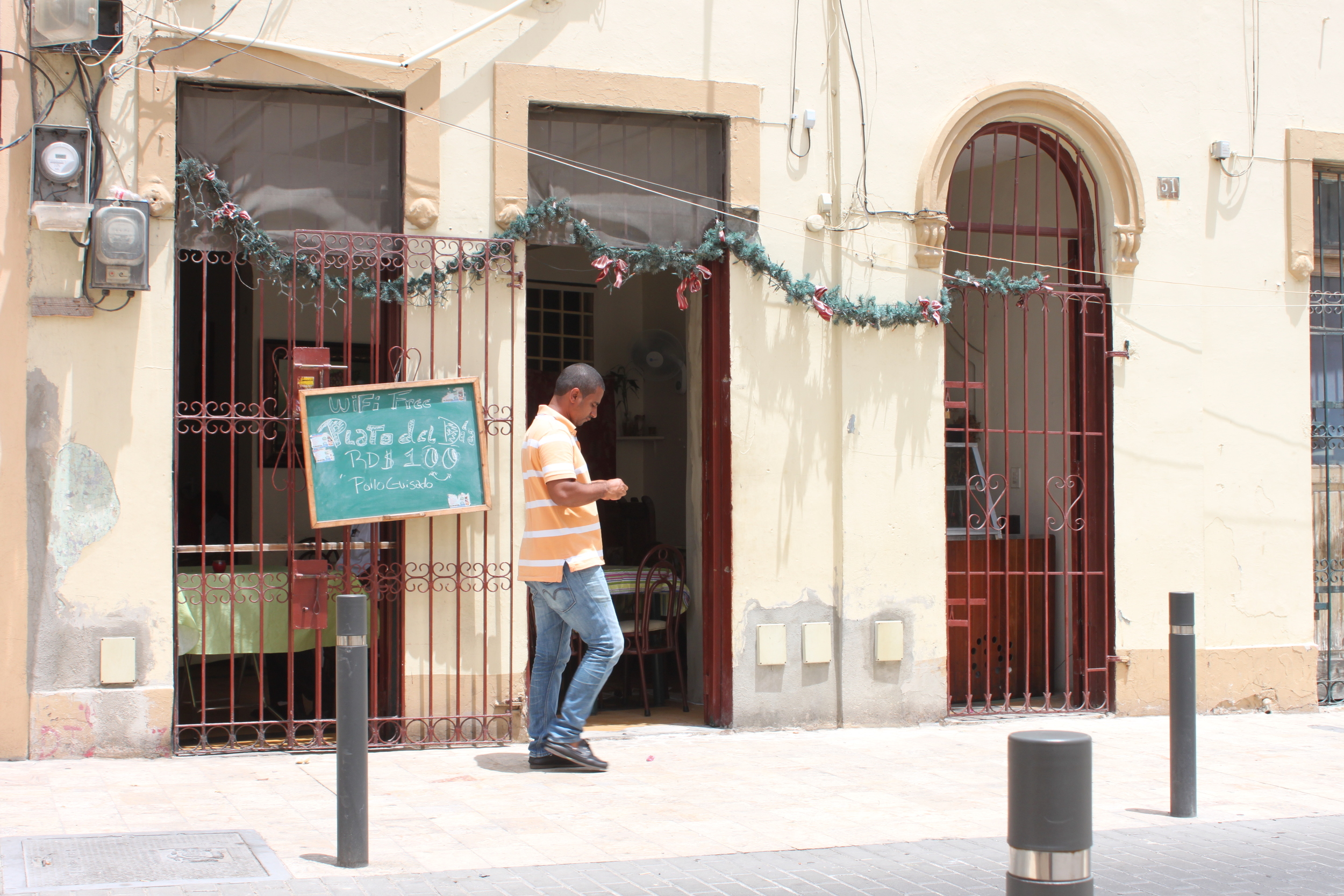
Free wifi in a 6-table cafe in Santo Domingo, Dominican Republic
2) Local sim card (voice only or voice and data)
For: Any traveler spending more than a couple of weeks in one country. Anyone needing to stay connected on the cheap. Anyone who wants a bit of a safety net when heading off the beaten track.
I often opt for this option if know I will be heading somewhere that requires complex navigation or organisation. I’ve gone as far as kissing my phone when I had taken the wrong bus, got dropped off in the middle of nowhere and the bus driver disappeared before I could quiz him on how I could get back to civilisation. I easily found the bus schedule on the city transport website and found an easy route to my destination.
Contacting airbnb hosts in the middle of the night when their directions have failed you is also a common one for me. The ability for my family back home to get in touch with me if I don’t have access to wifi in a more remote location also gives them a lot more confidence in my travel plans.
Often, with a bit of a research, you find that a sim card costs $1 or $2 and you can load as little as $1 worth of call time onto it.
My advice is to simply google the country name you are visiting and “phone plan”. You will usually find information on how to get a sim card and how to recharge. If you’re struggling for information or the details in English are lacking then you can always submit a request on a forum like Lonely Planet’s Thorn Tree or a local expat forum. You can also use your hotel or hostel as a resource.
Usually, voice only is the simplest and cheapest option. That said I have seen unlimited data plans in some Central American countries for as little as $15 a month.
To do: unlock your phone!
This step is very important if you’re going to be using a foreign sim card. You need to make sure you unlock your phone before you leave home. This could be as simple as changing your setting online or might require a phone call or in-store visit to your phone plan provider. Make sure you get this sorted out before you leave!
3) Data roaming
For: travellers travelling for brief periods in each country, have researched the data roaming policies with their phone companies and are comfortable with the policies and costs.
This is one that I am not very familiar with but do know some people opt for it mostly for the ease. If you need to make the odd phone call or quickly check a website while you’re on the road please make sure you understand how your particular phone plan treats data roaming and how much it costs.
You might not be able to rely on this method in all countries and regions depending on your phone company and plan.
Some phone plans now allow you to add-on a roaming package so you can use your phone overseas for a short amount of time and know exactly what you'll be in for upfront. This can make roaming a lot more affordable than it has been historically.
4) International sim
For: Frequent travellers or those who work while travelling.
This could be both the most convenient and the most expensive option. There are a number of companies that sell sim cards that you can use in multiple countries. You will not be getting great rates and coverage may be spotty, but the main benefit of this option is that you will have just one number that you can use anywhere in the world and your phone should simply work as you move from country to country.
I have never personally used any of these services as I have found the plans to be out of my budget and not all countries are covered. My advice would be to do your research and make sure you choose one that fits all your requirements and look for some first-hand reviews online.

5) Purchase a cheap phone
In some countries you might consider just buying a phone. Often with local promotions you will find that getting a simple phone is relatively cheap with included voice or data and it means you won't have to be as concerned with damaging your regular phone.
New technology
New plans and technologies are being rolled out all the time making it easier for travellers to stay connected. Just recently I heard about a local phone and internet company in Australia that is allowing you to access wifi anywhere in Australia if you allow your home internet to act as a hotspot. Customers will also be able to connect to hotspots overseas in 18 countries including the UK, Spain, Brazil, Japan, France and Germany.
http://exchange.telstra.com.au/2015/06/26/set-your-home-broadband-data-free/
There’s also a phone company in Central America that allows you to use your phone plan and sim in six neighbouring countries, including Mexico!
It’s never been easier to stay connected and have the information you need, you just need to do a little bit of research beforehand. Have you got any suggestions for using your phone overseas?

Is it Wrong to use Technology on the Road?
What's a good balance of indulging in our phones and tablets and spending time exploring the beautiful countries you've paid good money to visit. Here are my thoughts on using technology while traveling and when and where it should feature.
I’ve heard some criticism recently of the use of technology while travelling. Some see the backpackers hanging around in hostel common areas chatting on their phones or catching up on the latest episode of Game of Thrones on their tablet or laptop, and think it speaks to a new, less social age of travel. More than before we’re talking to each other on the road less and trying to stay connected with the folks at home. We’re getting lost in the online world instead of taking in the beauty and diversity of the area around us.
As someone who likes to stay connected and uses her laptop for work while while travelling, I’m definitely in a different camp. I believe that for most people it is important to stay connected with friends and family, just as you would if you were at home. It’s also important to have an avenue to allow you to disconnect. Moderation, however, is the key.
When travelling in some of the poorer regions of this world, you get glimpses of a life that is not always pleasant to see or be a part of. For me at least, this can take a toll on my mental state and I need more than anything some nights to sink into a nice happy episode of whatever is new on Netflix.
As someone who is travelling for months instead of weeks, it’s also important for me to keep up with my people back home and the new people that I meet as I travel. I’m looking forward to those free accommodation offers in Germany yall!

Staying connected
I know first hand that when you get back from a long trip it can be hard to restart those relationships. When I was 18, I travelled around South America for a year and when I got back things just weren’t the same with all my old friends. These were the days before Facebook and Whatsapp. Where scheduling a Skype session involved complicated calculations of when we were both awake and when the internet cafe was open.
I figured out that while I was being told about the Big Things - engagements, new houses, promotions - it’s really the little things that tie people together. These things are not something you think to include in a long email about what’s been happening, but with new technology you can now take the 30 seconds you need to send the snippets of your life.
When my friend Bel is waiting for the bus sometimes she’ll reach out and give me little snippets of her day. When my friend Gabe was recently waiting at the airport, exhausted after not having enough sleep, it’s easy for him to let me know how tired he is and that it was a terrible idea not getting a direct flight. These are things no one would bother or remember to write in an email but it’s really the little things that make up the conversation and fill the gaps once you get back home.
If you think about it, when you spend time with your friends, it’s rarely the big, life changing events that you discuss, it’s mostly the little things.
In my opinion, access to apps like Whatsapp and Snapchat allows you to keep up the conversation with your loved ones so that you can quickly share the little things. Just like you would at home.

Time for yourself
Even writing this is a good escape for me. I get to reflect on what I’m feeling as I travel, how I’ve handled certain situations and offer advice to new travelers on how they might avoid some of the mistakes I’vee made. Sure, I could write this all down in a journal, but how would I get it out there so that it could actually make a difference?
If you need it, take a night off and watch a movie or catch up on your favourite show. If you have something to share, spend some time chatting with your people back home. Don’t feel bad, seriously, what’s the difference between that and plunging into a good book on your hostel sofa? Of course, wearing headphones can be the surest way to say, “I don’t want to talk to anyone right now” but as you travel you realise that there's people everywhere. If you spend one night in your own head, you’ll be sure to meet people the next night.
Heck, you could even offer to watch something with someone else if they look bored. I know I have sometimes made some great travel friends when I’ve given them the opportunity to relax into a good movie in a hostel barren of other activities.
I think there’s definitely a balance. Try not to escape from the world around you too often and remember that if you’ve got headphones on then you have less chance of connecting with your fellow travelers.
The important thing is that you don’t worry about what other people think. If you need to chill, chill and if you need to hang out with your friends online, then do that.
Five very connected travellers got invited to take part in the trip of a lifetime recently but there was one big catch. They needed to completely let go, not just give up their phones but let themselves go for the whole trip in order to completely connect with the destination.